The best AI prototyping tool is the one whose output matches what you need to learn. If you need to test whether people understand a new flow, a quickly generated, editable interface prototype is enough. If you need to test the flow with real data, sign-in and saved records, you need a tool that generates a running app. Picking a tool before deciding which of those you need is the most common way to waste time with AI prototyping.
This 2027 planning guide compares five tools, Figma Make, Lovable, v0, Bolt and Uizard, using their official documentation and pricing pages checked in November 2026. Alongside the comparison, we provide one repeatable product brief and a test record so your team can put the same task through each tool and record what actually happens. Prices and features in this category change often, so check them again before buying.
Define the prototype task
Before opening any tool, write down the prototype task: what the prototype must let a person do, and what question you will answer by testing it. Without that, every tool looks impressive in a demo and none can be compared fairly.
A repeatable product brief
We use the same brief throughout, based on a fictional maintenance-scheduling product called Shiftboard. You can replace it with your own, but keep it the same for every tool you compare.
Brief. Build a prototype of a scheduling screen for a facilities dispatcher. It shows today’s jobs for four technicians. When a job is marked as running late, the dispatcher can move later jobs to another technician. Technicians see their updated list. Include an empty state (no jobs), a loading state, an error state (update failed) and a permission state (technician cannot reassign jobs).
The brief is small enough to build in a session and specific enough to reveal differences. It includes states, roles and a change of data, which are where generated prototypes most often fall short.
What question the prototype answers
Decide which of these you are testing, because it determines the tool you need:
- Comprehension: do dispatchers understand the schedule and the reassignment action? An interface prototype is enough.
- Behavior with data: does the flow still work with realistic numbers of jobs, changes and conflicts? A running app with a database is more useful.
- Technical direction: could this generated code become the start of the product? You need code you can export, read and maintain.
Our comparison of proof of concept, prototype and MVP explains how these questions map to different artifacts.
Evaluation protocol
Use the same protocol for every tool so results are comparable.
- Same brief, same first prompt. Paste the brief unchanged as the first prompt. Record the output before making any changes.
- Fixed iteration budget. Allow a set number of follow-up prompts or edits, for example ten, to fix problems. Record what you changed and how.
- State check. Confirm whether each required state (empty, loading, error, permission) exists and behaves correctly.
- Edit check. Change one label, one layout detail and one rule (for example, who can reassign). Record whether you did it by prompt, visual edit or code.
- Handoff check. Try to get the result out of the tool in the form your team needs: a shareable link, design layers, exported code or a repository.
- Cost record. Note the plan used and the credits, tokens or messages the task consumed.
- User check. Put the prototype in front of three to five representative users with a realistic task, and record whether they could complete it.
Record each result as pass, partial or not supported, with a sentence of evidence. Do not record a capability as a pass because the documentation says it exists; record what happened in your test.
Tool results by workflow
The tools fall into two broad workflows: those that start from design and interface generation, and those that generate full-stack running apps. The profiles below describe what each vendor documents.
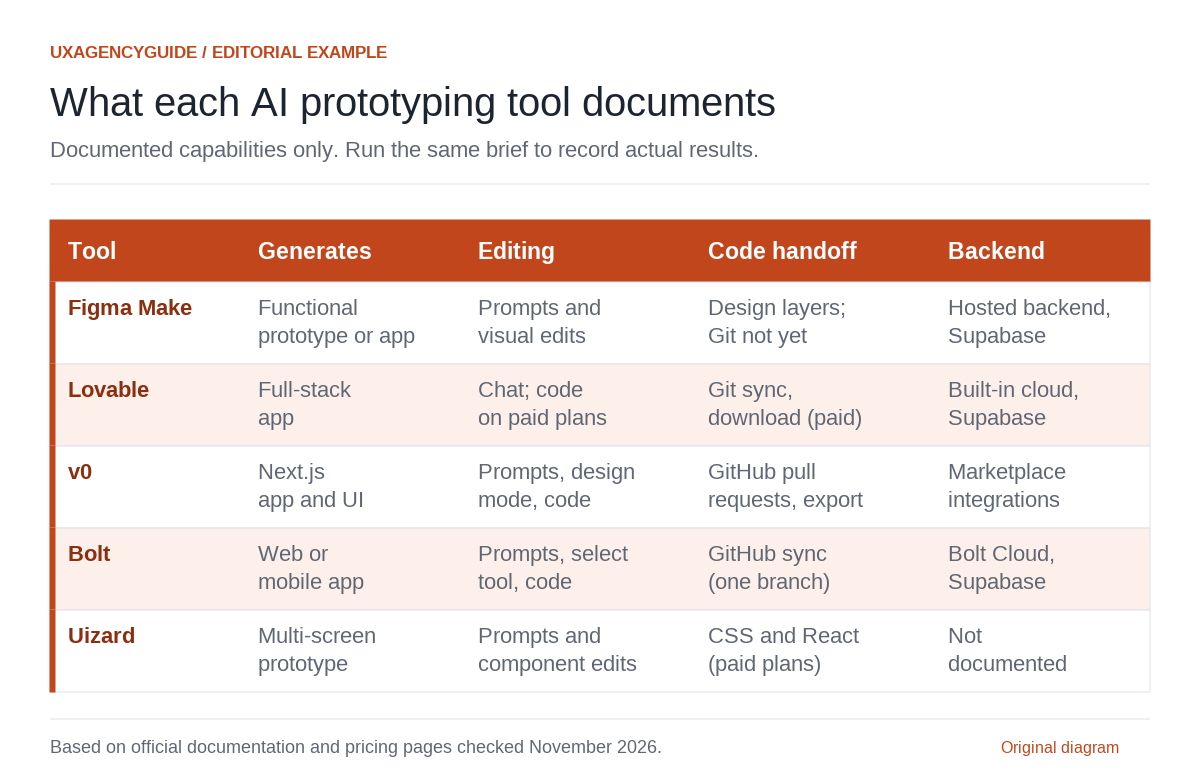
The five tools side by side
| Tool | What you can give it | What it produces | Data and backend | Code access | Publishing | Starting price |
|---|---|---|---|---|---|---|
| Figma Make | Prompts, voice, Figma designs, images, PDFs and data files | Functional prototypes and web apps that can be copied back to Figma as layers | Built-in Payload backend for data, sign-in and files; Supabase connection | Generated Payload and Next.js code inside the project | Figma-hosted link; custom domains for web apps | Starter free (up to 500 AI credits a month); Professional Full seat $16 per month |
| Uizard | Prompts, screenshots and hand-drawn wireframes | Editable mockups and clickable prototypes | Focused on screens and flows | React code for individual components | Shareable links and embeds | Free (3 AI generations a month); Pro $12 per month billed annually |
| Lovable | Chat prompts | Full web apps and websites | Built-in Cloud backend with a database and sign-in | Git sync on every plan; code editing and download on Pro | Hosting included; custom domains on Pro | Free (5 build credits a day); Pro from $25 per month |
| v0 | Prompts, screenshots, mockups, Figma links (paid plans) and GitHub repositories | Next.js apps with React, Tailwind and shadcn/ui | Backend connections, with settings managed in Vercel | Built-in code editor, GitHub sync and export; you own the code | One-click deploy to Vercel, with custom domains | Free (7 messages a day); Plus $30 per user per month |
| Bolt | Prompts and file uploads | Websites and apps | Bolt Database; choice of provider on Pro | GitHub sync and version history | Hosting included; custom domains on Pro | Free (1M tokens a month); Pro $25 per month |
Prices are in US dollars as shown on each vendor’s own pricing page on 23 November 2026. Billing periods and plan names change often, so check the current page before buying.
The split is clear. Figma Make and Uizard start from design and keep you close to it; Lovable, v0 and Bolt start from code and are built to reach a working, hosted app. Choose by where the result needs to end up: back in the design file, or in a repository your developers will maintain.
Figma Make: prototypes inside the design workflow
Figma’s pricing page describes Make as generating a functional prototype or web app from a prompt, and its Make page describes the output as code-backed and visually editable. Output can be published to a URL or copied back into Figma as design layers, which is useful when designers want to continue refining the result in their usual tool. Figma’s help article on adding a backend documents a Figma-hosted backend with a database, file storage and authentication, and a manual connection to Supabase. The same article says GitHub integration and local-codebase workflows are not yet available for those apps.
On pricing, the Starter plan is free with 150 AI credits per day and up to 500 per month. A Professional full seat is listed at $16 per month with 3,000 AI credits. Figma notes that AI credits are shared across its AI features and are subject to change.
Figma Make suits teams already working in Figma who want a functional prototype that stays connected to design files.
Uizard: fast screen generation for early concepts
Uizard describes generating multi-screen, editable prototypes from text and turning screenshots and sketches into editable mockups. Changes are made by selecting components and describing the change. Its pricing page lists a free plan with three AI generations per month and exports at 1x resolution as images or PDF, a Pro plan at $12 per month billed annually with 500 generations and developer handoff in CSS and React components, and a Business plan at $39 per month billed annually.
Uizard suits early concept exploration, especially for people without design tools experience. Its output is a prototype rather than a running app with data.
Lovable: full-stack apps from conversation
Lovable’s documentation states that it generates a working application including frontend, backend, database, authentication and integrations, all backed by editable code. Work happens in a chat with plan and build modes. Its subscription plans page lists a free plan with five credits a day, capped at 30 a month, and a Pro plan from $25 per month for 100 credits; code editing and code download are available on Pro and above. Its Git sync documentation describes two-way sync with GitHub, GitLab or Bitbucket on all plans, one branch at a time, and notes that it exports only, without importing existing repositories.
Lovable suits teams that want a working prototype with real data and sign-in quickly, and that are comfortable reviewing generated code.
v0: code-first generation in a Next.js stack
v0’s documentation describes it as an AI agent that creates real code and full-stack apps. Its FAQ says it generates Next.js, React, TypeScript, Tailwind and shadcn/ui code, includes a VS Code-style editor and supports exporting code to work locally; a Design Mode allows visual edits. Its GitHub integration creates a private repository and publishes changes through pull requests. The pricing page lists a free plan with a seven-message daily limit and paid Plus and Business plans with monthly credits, with Business at $100 per user per month.
v0 suits teams whose production stack matches its output, and who want generated work to move into normal code review through pull requests.
Bolt: running apps with code and hosting
Bolt’s support documentation describes generating web or mobile apps from prompts, a plan mode before code is written, a select tool for visual edits and a code view where you can edit files and run terminal commands. Bolt Cloud provides a database, sign-in, file storage and server functions. Its Git documentation describes GitHub sync with automatic commits and notes that a project cannot switch branches and that disconnecting is permanent. The pricing page lists a free plan with a 300K daily token limit and 1M tokens a month, Pro at $25 per month starting at 10M tokens and Teams at $30 per member per month.
Bolt suits teams that want an app they can run, edit at code level and host from one place.
State logic and editability
The brief’s required states reveal more about a tool than its first screen. Generated prototypes usually show the main successful path. Empty, loading, error and permission states are where differences appear, and where your test record will be most useful.
For interface-first tools, states usually need to be requested explicitly and checked screen by screen. For full-stack tools, states depend on data and logic, so they can behave realistically, but they can also fail in ways that are hard to see without reading the code.
Editability matters as much as first output. Record how you made each change in your edit check:
- By prompt: fastest for broad changes, least predictable for small ones. A prompt to change one label can alter other parts of the screen.
- By visual edit: best for layout and copy. Figma Make, v0’s Design Mode, Bolt’s select tool and Uizard all document some form of visual editing.
- By code: most precise, but only useful if someone on the team can read and maintain the code. Lovable (on paid plans), v0 and Bolt document code editing.
A tool that produces an impressive first result but makes small changes unreliable will cost more time over a real project than one with a plainer first result and precise editing.
Review AI features inside the prototype
If your prototype includes AI behavior itself, such as a suggested schedule, review it against Microsoft’s Guidelines for Human-AI Interaction. Generated interfaces often present AI output without explaining it, offering correction or showing consequences. Our AI interface design guide covers the review, confirmation and recovery patterns to add.
Handoff, integration and pricing limits
How a prototype leaves the tool decides whether it helps or becomes a dead end.
Handoff routes
- Shareable link: all five tools document publishing or sharing. This is enough for user testing.
- Design layers: Figma Make documents copying previews as Figma design layers, which keeps design work in one place.
- Exported code: Lovable (Pro and above), v0 and Bolt document code export or download. Uizard documents CSS and React component handoff on paid plans.
- Repository sync: Lovable, v0 and Bolt document GitHub sync, each with documented limits such as single-branch work or export-only sync.
Integration limits
Full-stack tools document their own backends and connections to services such as Supabase. These make prototypes realistic, but they also create dependencies. Before putting real user data into a prototype, check where the data is hosted, who can access it and how to delete it. Figma notes, for example, that its hosted backend currently runs in the eastern United States.
Pricing limits
All five tools use usage-based limits: credits, tokens, generations or messages. Usage per task is hard to predict from documentation, because failed attempts and repeated fixes consume allowances. Lovable and Bolt document that unused paid allowances expire after a period, and Figma notes that included AI credits are subject to change. Record actual consumption in your test, and budget for iteration rather than for a single perfect generation.
Choose and validate the output
Choose the tool based on your test record, not on the demo.
| If your question is | Start with | Check carefully |
|---|---|---|
| Do people understand this flow? | Figma Make or Uizard | Whether all required states exist |
| Does it work with realistic data? | Lovable, Bolt or v0 | Data handling, permissions and error behavior |
| Could this become our codebase? | v0, Lovable or Bolt | Code quality, stack fit and repository limits |
| Can designers keep refining it? | Figma Make | How design layers and code stay in sync |
Validate with people, not only with the tool
A generated prototype is a faster way to create something testable. It is not evidence that the design works. Put it in front of representative users with realistic tasks, as described in our usability testing methods guide, and record what they do.
Treat generated code as a draft
If you plan to build on generated code, review it as you would any external contribution: security, data handling, accessibility, performance and maintainability. Generated code can look complete while missing validation, error handling or access control. Our UX design tools guide covers how prototyping fits alongside design and handoff tools.
Compare the two most common choices
If you are choosing between Figma Make and Lovable specifically, our Figma Make vs. Lovable comparison runs both against the same brief.
When to use a specialist
Some teams use agencies to build AI prototypes. Cieden’s AI prototyping service describes building proof-of-concept apps with real AI integrations rather than static mockups, with a feature exploration sprint from $8,000 and a proof-of-concept app from $16,000. Netguru’s product discovery service describes a time-boxed engagement of typically two to six weeks producing research findings, a prioritized feature list, a feasibility report and wireframes or a prototype; it scopes pricing individually. Neither page establishes which tools these agencies use. A specialist is most useful when the prototype needs real integrations, careful AI behavior or research planning that a tool alone will not provide.
A blank test record
Copy this structure for each tool you evaluate:
| Check | Result (pass, partial, not supported) | Evidence |
|---|---|---|
| First output matches the brief | ||
| Empty, loading, error and permission states | ||
| Label, layout and rule edits | ||
| Handoff in the form we need | ||
| Credits or tokens used for the task | ||
| Users completed the task |
Fill it in during the session, while the details are fresh. A completed record for each tool gives you a defensible choice, and it will be just as useful when the tools change and you need to evaluate them again.
Frequently asked questions
How did you compare these AI prototyping tools?
We compared the five tools using their official documentation, help centers and pricing pages, checked on 23 November 2026, against one repeatable product brief. The guide also includes a test record so your team can put the same brief through each tool and compare the results.
What is the difference between an AI prototype and an MVP?
An AI-generated prototype shows how a product might look and behave so you can test it with people. An MVP is a working release used for real tasks. Some tools generate running code that could become the start of an MVP, but generated code still needs review for security, data handling, accessibility and maintainability.
Which AI prototyping tool is best for designers?
Tools that keep output close to a design workflow, such as Figma Make with its ability to copy previews into design layers, or Uizard for quick screen generation, suit designers exploring interface ideas. Tools that generate full-stack apps, such as Lovable, v0 and Bolt, suit teams that want a working prototype with data, though they need more technical review.
Can AI prototyping tools replace user testing?
No. They make it faster to create something testable, which can make user testing easier to schedule. A generated prototype still needs to be tested with real users on realistic tasks to show whether the design works.
Sources & evidence
- Figma pricingChecked 2026-11-20
- Figma MakeChecked 2026-11-20
- Add a backend to a functional prototype or web appChecked 2026-11-20
- Lovable documentationChecked 2026-11-20
- Lovable subscription plansChecked 2026-11-20
- Lovable Git sync overviewChecked 2026-11-20
- v0 documentationChecked 2026-11-20
- v0 GitHub integrationChecked 2026-11-20
- v0 FAQsChecked 2026-11-20
- v0 pricingChecked 2026-11-20
- Bolt support documentationChecked 2026-11-20
- Bolt Git integrationChecked 2026-11-20
- Bolt pricingChecked 2026-11-20
- Uizard pricingChecked 2026-11-20
- UizardChecked 2026-11-20
- AI prototyping serviceChecked 2026-11-20
- Product discovery servicesChecked 2026-11-20
- Microsoft HAX Toolkit guidelines for human-AI interactionChecked 2026-11-20
- Publish a Figma Make fileChecked 2026-11-23
- Uizard exporting projectsChecked 2026-11-23
- Lovable plans and creditsChecked 2026-11-23
- Bolt version history and GitHubChecked 2026-11-23
Specific sources, useful examples and clear limitations make advice easier to assess.
Read the editorial policy