Figma and Framer now overlap, but they are built around different jobs. Figma is a design tool for products, design systems and collaboration that has added website publishing through Figma Sites, still in beta. Framer is a website builder with a design canvas, built around publishing, hosting and managing marketing sites. If your main job is designing a product and its components, Figma is the stronger fit. If your main job is publishing and maintaining a website, Framer is built for it. Many teams use both.
This comparison is based on both products’ official documentation and pricing pages, checked in November 2026. We also define one matched task so your team can try it in both and record the results. Product details change quickly here, especially for Figma Sites, so check current documentation before deciding.
What job are you comparing?
The phrase “Figma vs Framer” usually hides one of three questions.
- Where should we design our product? For app interfaces, design systems and developer handoff, this is a design-tool question. Figma’s strength is here, with shared components and libraries documented in its guide to components.
- Where should we build and host our marketing website? This is a website-platform question. Framer is built for it, and Figma Sites is Figma’s newer answer.
- Can one tool do both? Sometimes, for small teams with simple websites. Larger teams usually keep product design and website publishing in separate tools, connected by a shared visual language.
Be clear which question you are answering. Teams often compare the tools on the first question and choose based on the second.
Test setup and current products
A matched task
Build the same small marketing page in both tools:
Task. A homepage for a fictional scheduling product, Shiftboard, with a hero section, three feature blocks, a pricing table, a blog list fed by three CMS posts and a contact form. Make it responsive at desktop, tablet and mobile widths. Publish it to a custom domain, set page titles and descriptions, and ask a non-designer to update one blog post.
The task covers design, responsiveness, CMS, publishing, search settings and editing by someone other than the designer. Those are where the two tools differ.
Current products
Figma Sites. Figma’s Explore Figma Sites article describes designing, prototyping and publishing websites in Figma using its existing design tools, with copy and paste between Figma Design and Sites. Figma says it was released in open beta at Config 2025, and its pricing page still labels it beta and available on full seats.
Framer. Framer’s help center documents publishing, custom domains, staging and versions, branches and its own hosting. Its pricing page lists site plans based on pages, CMS collections, CMS items and bandwidth.
Publishing side by side
| Figma Sites | Framer | |
|---|---|---|
| Status | Open beta since Config 2025 | Established site plans |
| Who can publish | Full seat on a paid Figma plan (Professional $16 per month) | Any site plan; custom domain from Basic |
| Site price | Included with the Full seat | Free plan; Basic $10 per month; Pro $30 per month |
| CMS | Collections, lists and pages, in beta | Basic 2 collections; Pro 10 collections |
| Search settings | Site title, social previews and password protection | Page titles and descriptions, automatic sitemap and robots.txt, JSON-LD; redirects on Pro |
| Hosting | Hosted by Figma on AWS in the United States; site code stays on Figma | Hosted by Framer; staging on Pro |
| Editors | Full seat to edit; others view and comment free | Extra editors $20; content editors $10; viewers free |
Prices are in US dollars as shown on each vendor’s own pricing page on 23 November 2026. Billing periods and plan names change often, so check the current page before buying.
Design and collaboration
Figma. Figma’s core strength is collaborative design: shared files, comments, components with instances that update from a main component and team libraries shared across files. For product teams, this is the foundation of a design system. Neuron’s DesignOps service, for example, describes establishing workflows, tools and automations within Figma and connecting design to code through tools such as Storybook. That kind of investment ties a product team to its design tool far more than any single website does.
Framer. Framer provides a design canvas aimed at websites, with responsive layout, interactions and components for site sections. Its pricing page lists free viewers who can comment, additional editors who can design and publish, and lower-cost content editors who can update the CMS and use on-page editing. That role structure reflects its focus on maintaining published sites.
For product design, Figma’s collaboration and component model are the more established choice. For website design that will be published directly, Framer’s canvas removes the step of rebuilding a design in another tool.
Prototype and publish workflows
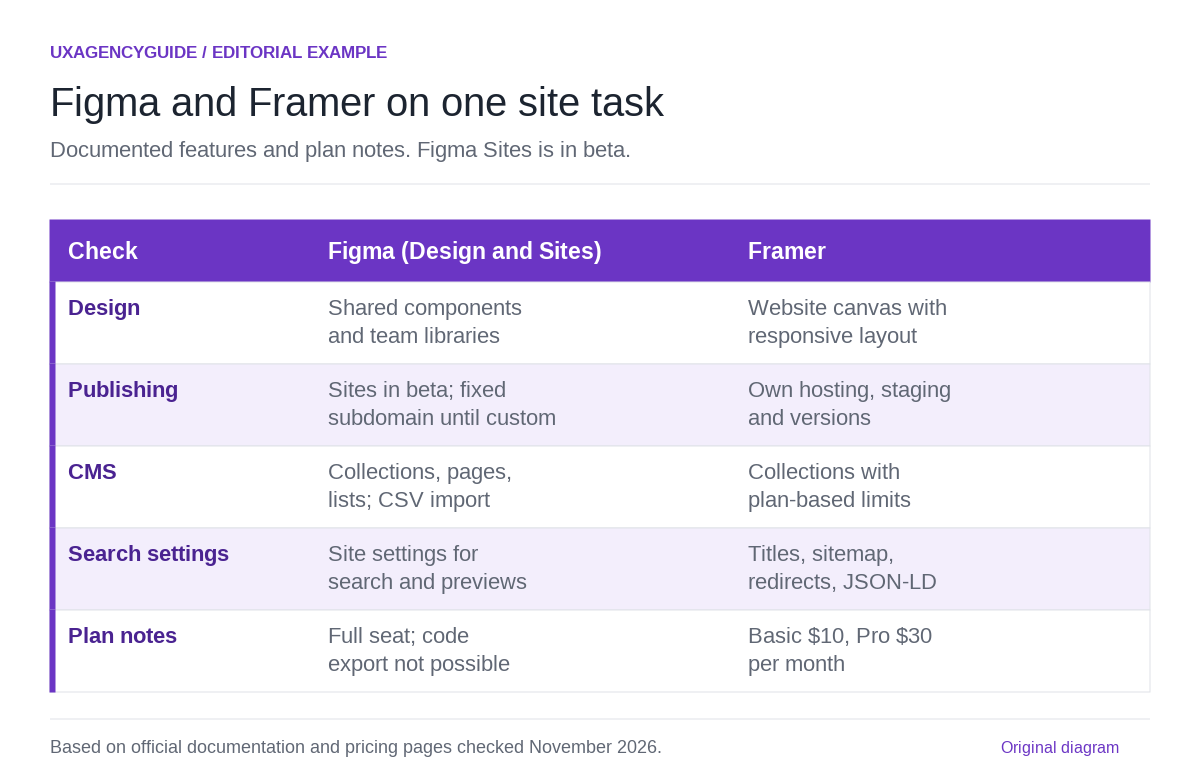
Publishing with Figma Sites
Figma’s article on publishing a site says publishing is available on Professional, Education, Organization and Enterprise plans and requires edit access. Sites first publish to a random figma.site subdomain, which Figma says cannot currently be changed, and you can republish earlier versions or unpublish. Figma states that sites are hosted on AWS in the United States and that code export is not currently possible. Its custom domain article lists custom domains on Professional (up to ten), Organization and Enterprise plans, with one custom domain per site.
Figma’s CMS guide describes collections, template pages with one URL per item and repeating lists, with CSV import. Check the current plan page for item and collection limits.
Publishing with Framer
Framer documents publishing to its own hosting with custom domains, staging and versioning. Its pricing page sets limits by plan: the Basic plan at $10 per month includes 30 pages, 2 CMS collections and 1,000 CMS items; the Pro plan at $30 per month includes 150 pages, 10 collections and 2,500 items, plus redirects, a staging environment and branching. Framer notes that all prices are monthly and billed by the cycle chosen at checkout. Its SEO documentation covers page titles and descriptions (including dynamic values from CMS items), an automatically generated sitemap, robots.txt, redirects, structured data in JSON-LD and connection to Google Search Console. Localization is available as an add-on at $20 per locale.
What this means in practice
Framer’s documentation is deeper on publishing controls today: search settings, redirects, staging, localization and documented plan limits. Figma Sites is promising for teams who already design in Figma, but its beta status, fixed subdomain before a custom domain is added and lack of code export are important constraints for a production marketing site.
Handoff and maintenance
A website is maintained for years, usually by people other than its designer. Maintenance often matters more than initial build.
Editing by non-designers. Framer documents content editors who can update the CMS, localization and on-page content at a lower seat price. Figma Sites requires edit access to publish. Check how each tool handles a marketer who should update blog posts without touching layouts.
Developer handoff. If developers will rebuild or extend the site, code export matters. Figma states that code export from Sites is not currently possible. If your site may eventually move to custom code, factor that in.
Design system connection. If your product uses a design system in Figma, Figma Sites can reuse the same components directly. Framer sites need their own components that follow the same visual language. Agencies that deliver websites typically design in a design tool and then prepare assets for whoever builds the site; Arounda’s redesign service, for instance, describes a design support stage that prepares final assets for development. Where a single tool handles both, that handoff stage shrinks.
Search and accessibility checks. Whichever tool you use, check page titles, descriptions, heading structure, alt text, keyboard navigation and color contrast on the published site, not only in the editor. Framer’s accessibility documentation covers alt text, semantic tags, tab order and contrast.
Moving between tools
Teams often design a website in Figma and then build it in Framer. Plan for rebuilding the design in Framer rather than assuming a direct import. Treat the Figma file as the specification: shared styles, spacing and components make the rebuild faster and more accurate. Check current documentation and plugins for both tools, as this area changes often.
If you start in Figma Sites, the main risk is the reverse. Because code export is not currently possible, moving a site out of Figma Sites later means rebuilding it elsewhere. That is acceptable for a short-lived campaign site, and a bigger decision for a site you expect to run for years.
Common mistakes
- Choosing the website tool for product design. A website builder is a poor home for an app’s design system and developer handoff.
- Choosing the product design tool for a complex website without checking publishing controls such as redirects, localization and editor roles.
- Ignoring who will maintain the site. The person updating blog posts next year matters more than the designer building it this month.
- Comparing plans by price alone. Page limits, CMS limits, editor seats and add-ons change the real cost as the site grows.
Choose a tool or connected workflow
| Situation | Practical choice |
|---|---|
| Product team designing an app and a design system | Figma for the product; choose a website platform separately |
| Small team, marketing site is the main product | Framer for design and publishing |
| Team designs everything in Figma, simple site, accepts beta | Figma Sites, with a plan to review once it leaves beta |
| Site needs localization, redirects and staging today | Framer, based on its current documentation |
| Site may move to custom code later | Check code export carefully; Figma Sites states it is not currently possible |
A connected workflow
Many teams use both tools on purpose. Figma holds the product design and design system. The website is built in Framer using the same colors, typography and spacing, documented in a shared style guide. That keeps product design work in a tool built for it and website publishing in a tool built for that, connected by shared foundations rather than shared files. Our design system comparison explains how a style guide and tokens keep separate tools consistent.
If you are choosing a website platform
If the real question is which website platform to use, compare Framer with other website builders against the same brief. Our Framer vs. Webflow comparison does that for startup marketing sites, and our Figma alternatives guide covers design tools for product work.
Record the results
Run the matched task in both tools and record, for each: how long the page took to design, whether it was responsive at all three widths, whether the CMS posts displayed correctly, how publishing to a custom domain worked, what the search settings allowed and how easily the non-designer updated a post. Note the plan used for each. That record will show which tool fits your team’s real workflow, and give you a baseline for reviewing the decision as Figma Sites develops.
Whatever you decide, revisit it once a year. Both products change quickly, and Figma Sites in particular may look very different once it leaves beta. A short re-run of the matched task is usually enough to confirm the choice or show that it is time to change.
Frequently asked questions
Can Figma publish websites now?
Yes, through Figma Sites, which Figma released in open beta in 2025. Its documentation describes designing, prototyping and publishing websites in Figma, with a CMS for structured content and custom domains on paid plans. As of November 2026 it is still labeled beta, and Figma states that code export is not currently possible.
Is Framer a replacement for Figma?
For marketing websites, Framer can cover design and publishing in one tool. For product design, such as app interfaces, design systems and developer handoff, most teams still use a design tool like Figma. Many teams use both: Figma for the product, Framer for the website.
Which is better for a startup website?
Framer is built around publishing websites, with documented SEO settings, localization, CMS collections and hosting. Figma Sites is attractive if your team already designs everything in Figma and accepts beta limitations. Compare both against the same small site and your editors’ needs before committing.
How did you compare Figma and Framer?
We compared both tools using their official documentation and pricing pages, checked on 23 November 2026, against one matched task: designing and publishing the same page. You can run the same task in both and compare the results.
Sources & evidence
- Explore Figma SitesChecked 2026-11-20
- Publish, update or unpublish a siteChecked 2026-11-20
- Manage a custom domain for your siteChecked 2026-11-20
- Guide to Figma Sites CMSChecked 2026-11-20
- Figma pricingChecked 2026-11-20
- Guide to components in FigmaChecked 2026-11-20
- Framer pricingChecked 2026-11-20
- Framer CMS helpChecked 2026-11-20
- Framer publishing helpChecked 2026-11-20
- Framer SEO helpChecked 2026-11-20
- Website redesign servicesChecked 2026-11-20
- DesignOps servicesChecked 2026-11-20
- Framer accessibility helpChecked 2026-11-20
- Figma Sites helpChecked 2026-11-23
- Framer SEO guideChecked 2026-11-23
Specific sources, useful examples and clear limitations make advice easier to assess.
Read the editorial policy